Edmonton Smart Home Control
Your whole house on one switch, or just your voice.
Yesterday I pulled 36 switches out of an Edmonton home and put smart ones back in. He runs the whole house from his phone now, or he talks to it. I run the same system in my own house, so this is not a product I read about.
Wired by a licensed Master Electrician #13824, 14 years on the tools
The switches go in the same boxes that are already in your walls
Permit pulled, inspected.
Quote in 60 seconds. Master Electrician calls back.
Drop your number. Dmitry calls the same day, or first thing next morning. No pitch, no forms.
Got it. Dmitry will call from (780) 904-3462 the same day, or first thing next morning.
Master Electrician #13824. Reply STOP to opt out anytime.Booking walkthroughs now. Most homes get looked at within 3 to 5 business days.
What it costs
- Tier 1, Control CoreFrom $3,100One day on site. 6 lighting devices, smart hub, smart thermostat.
- Tier 2, Connected HomeFrom $6,900Two days on site. 14 lighting devices, premium thermostat, garage door control.
- Tier 3, Signature ControlFrom $21,100Three to five days on site. Engineered lighting control and load management.
Daylight where there is no window
A basement with no windows, and a sky in the ceiling.
These are LED skylight panels I put into a house in Edmonton. Flat 2x2 panels came out, skylights went into the same openings. No ceiling work, no drywall, same grid. Pick a room and slide through what actually changed.
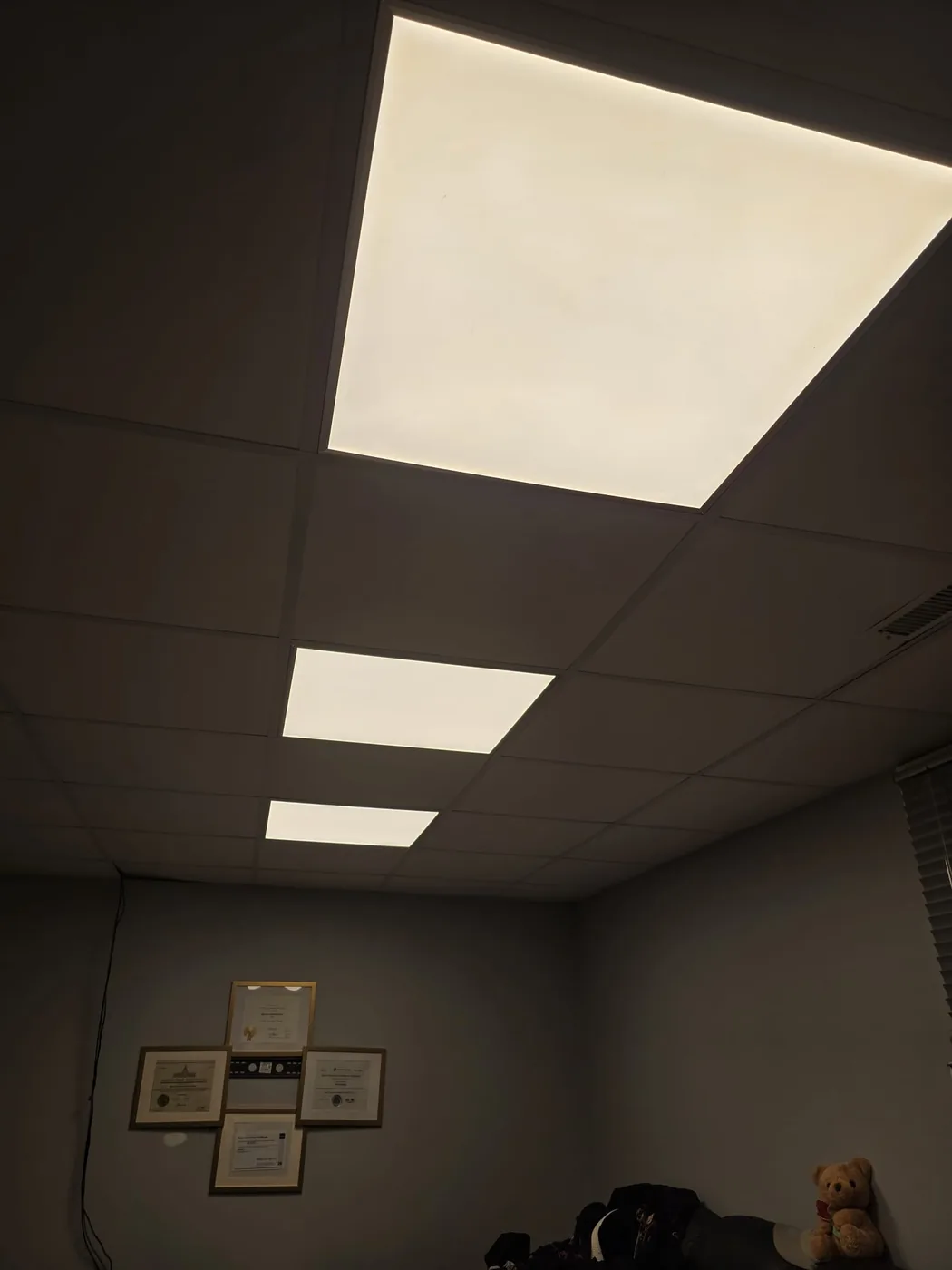
BeforeThe old fixture. A flat 2x2 panel, lit corner to corner, and nothing else.
Edmonton. Three flat 2x2 panels came out, three Feit Vista skylights went in.
What the fixture can do once it is in
- One tapSky and white light together
- Two tapsWhite light only
- Three tapsSky on its own
The fixture counts taps on the wall switch, so it has three looks on one set of wires. That is the manufacturer's own setup, published by Feit Electric, not something I rigged up. The photos above are the swap, not the tap modes.
Ask me this oneCan you dim them?Not on a normal dimmer. Here is why.
These panels dim on 0 to 10V, which is a separate pair of low voltage wires run back to a 0 to 10V control. That is a decision you make when the wiring goes in, not a part you add afterward. On this job we did not run it, so these are on smart switches and they are on or off.
I did not put a standard dimmer on them either. The dimmers on that job went on other fixtures that are built for it. If you want these dimmed, say so at the walkthrough and I will price the low voltage run with them.
Every panel got its own smart switch
Smart switches went in with the panels. Say it out loud, press it in the app from anywhere, or just use the paddle on the wall like a normal person. Basement and office are on their own switches, so one room does not drag the other on with it.
Drop ceiling, dull basement, windowless office. I will tell you at the walkthrough whether your grid takes them. Or call (780) 904-3462.
Hands free
Say it. Tap it. Or let it run itself.
With a Leviton smart panel, one app runs the breakers, the lights and the EV charger, and it all works with Google Home, Alexa, SmartThings and Apple Home.
- From anywhere
- One app
- Your voice
Leviton says My Leviton devices work with Matter, Amazon Alexa, Google Home, Apple Home and SmartThings. Source: Leviton smart home page, read 30 September 2026.
See what it costsHow the Leviton panel worksI test it in my own house first
The bathroom fan I put in my own ceiling.
Same rule as solar. I run it in my own home before it goes on a customer's quote.
- This one replaced a rattly builder grade fan in my bathroom.
- It moves more air, it is quieter, it plays music off my phone, and the light does full colour.
- Slide through the four stages below. That is my ceiling, my ladder, my arm.
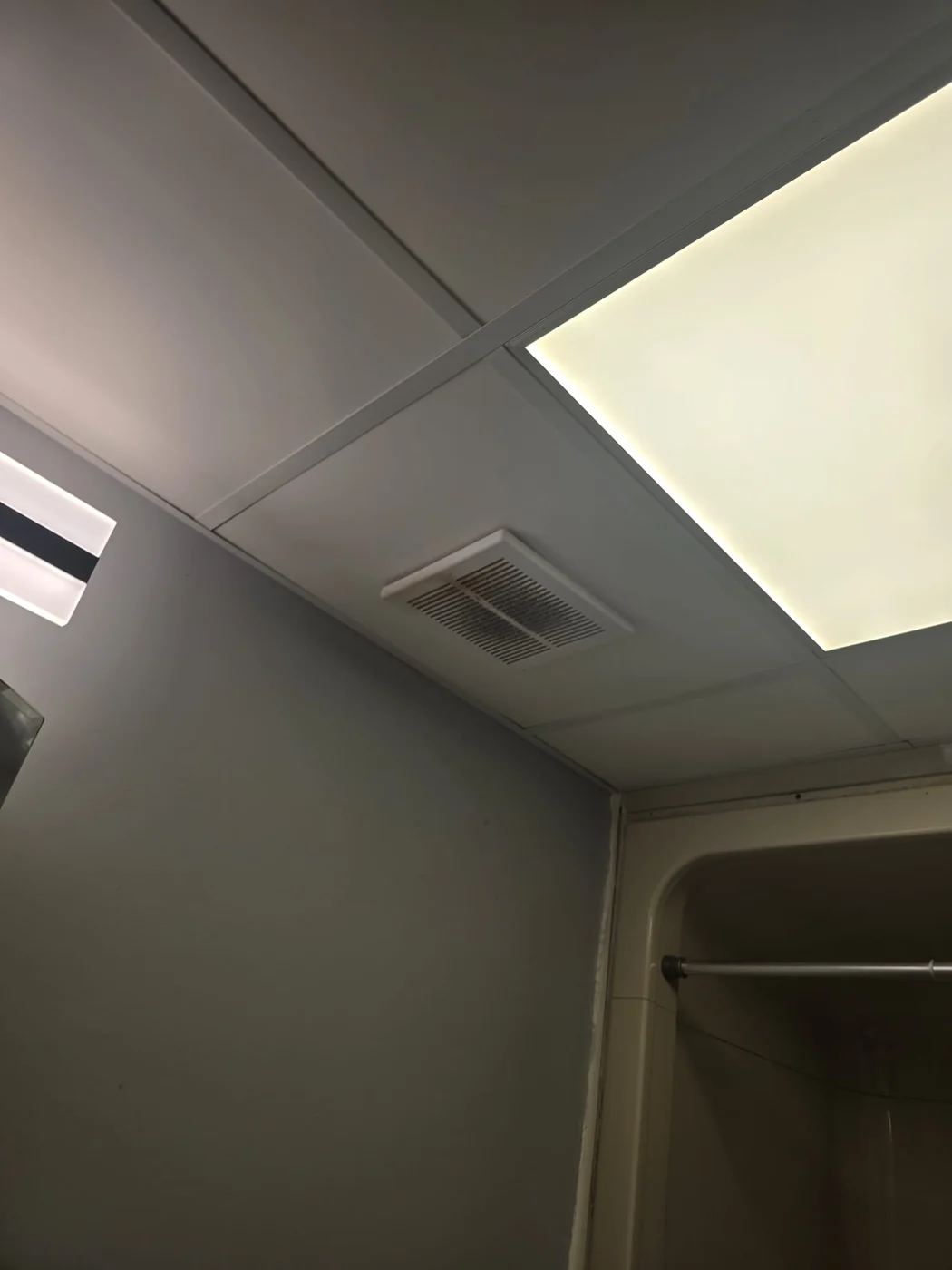
BeforeThe fan that came with the place. Small grille, one speed, loud enough that you left the door open instead.
My own bathroom, Edmonton. Drop ceiling, so the tile lifts out and the work happens from underneath.
What it actually does, once it is wired and set up
- Turns itself on when the shower steams upA humidity sensor runs the fan when the room needs it and shuts it off when it does not. Worth knowing: it ships with that sensor switched off. Somebody has to turn it on, and most people never find out it was there.
- Runs on a schedule, or from anywhereApp control over your own Wi-Fi, no extra hub on the wall. Set it to vent for ten minutes every morning if that is what your bathroom needs.
- Plays music through a speaker in the fanYou pair your phone to it over Bluetooth, same as a portable speaker, and it comes out of the ceiling. That is the honest version. It is not a streaming speaker and it will not take a voice request for a song.
- Answers to Google or AlexaFan on, light off, colour change, all by voice. I use the wall switch most of the time, because a switch on the wall never needs an update.
- Full colour, and six real whitesAny colour you like for the evening, and a proper daylight white when you are actually trying to see. A dim night light on its own for two in the morning.
- Six years on the partsSix year limited warranty on the fixture, and three years on the sensor parts. Two different numbers, so I am giving you both.
Product is the Commercial Electric BF1112 on Hubspace. Every number above is off the manufacturer's own installation manual and product listing, not off my memory. I am not a dealer for it and I make nothing on the box.
Read this before you want oneWhat I will not pretend about this fanFour things that decide whether it fits your bathroom.
It needs a neutral at the fan. That is normal for a fan, but if your bathroom is on old two wire with no neutral in the box, that is a wiring job before it is a fan job. I find that out by looking, not by guessing over the phone.
Mine was easy because of the drop ceiling. Tile lifts out, the duct and the joists are right there, no drywall touched. A finished drywall ceiling is a different day of work and a patch afterward. Do not read my four photos as your four photos.
Directly over a tub or shower it has to be on a GFCI protected circuit, and it has to be a model marked for that spot. Mine is not over the shower. If yours would be, that changes the circuit, not just the fixture.
It is a bathroom fan, not a kitchen fan. The manufacturer says not for kitchens, general ventilating only. And the duct goes outside, never into an attic, which is the single most common thing I find wrong in older houses.
What I do not know yet. I have had mine a short while, so I cannot tell you how the speaker or the sensor hold up after five years. When I know, this paragraph changes. The old fan it replaced lasted a long time being loud, which is its own kind of reliability.
If your bathroom fan is loud, or there is no fan at all and the mirror never clears, that is worth fixing whether or not you want the colours. Book a walkthrough and I will tell you what your ceiling and your wiring will take. Or call (780) 904-3462.
Six parts, and one of them is on the wall. Tap any part of it.
Tap a part of the room. I will tell you what that piece does and why it is there, then take you to the part of this page that goes deep on it.
The switch on the wall
This is the part you actually touch. It still works as a switch when nobody has a phone out, and it looks like it belongs in the room rather than like a gadget somebody added later.
Nothing gets torn openWhat is behind it
Most of this goes into a 1970s house without opening a wall. That is the whole trick, and it is why a retrofit is worth doing at all instead of waiting for a renovation you were never going to book.
How it goes into an old houseThe hub, not the router
The system runs on its own hub. If the internet drops, the lights still work, because a light switch that needs a working router is a worse light switch than the one it replaced.
Why it does not use your routerThe screen
This is the screen you end up living in. There is a working version of it further down this page that you can actually press, before you spend a dollar, because a demo beats a description.
Try the real screenWhat you choose to run
Lights, blinds, thermostat, locks. What you pick is what sets the tier, and the tier is what sets the price. You choose the list, then the number follows from it rather than the other way round.
Pick yours and see the tierThe handover
You get the documentation, the accounts and the admin access. It is your house, so it is your system. Nothing about it is set up so that you have to call me to change a light.
See what the handover includesTap a numbered pin, or use the arrow keys.
What actually changes
Nothing gets torn open. The switch changes.
Smart control is not a renovation. It is line voltage work inside the boxes that are already in your walls, and it needs a permit and a licence because of that.
Your switch today
On or off. One spot in the house controls one set of lights.
Smart dimmer
Same box, same paddle you can press by hand. It just also listens.
The hub
Its own radio, not your Wi-Fi. The lights answer the switch even when the internet drops.
Phone or voice
In my own house I say it out loud and the lights go on. Works with Google and Alexa.
The paddle on the wall never stops working. That matters more than people expect, because guests, kids and grandparents do not want an app to turn on a light.
What it looks like in your hand
This is the screen. Go ahead and use it.
Every smart home page I have ever read sells hubs and wiring and never shows you the thing you actually touch every day. So here it is, working, on this page, before you spend a dollar. Tap a room and the plan beside it lights up.
The number just went redWhy staging beats a service upgradeThe cheaper answer, and when it is not.
Turn on the EV charger and the range together on a 100 A service and watch what happens. That is the exact problem load management solves.
Staging the big loads so they never run at the same second is often cheaper than upsizing the service, and it is the reason load management is in Tier 3. If a load calculation says the service genuinely has to grow, I will tell you that instead of selling you a workaround.
Tap one to hear what it does
Fair questionDo I have to use voice at all?No. Here is what still works by hand.
Works with Google and Alexa. It is not required, though. Every paddle on the wall still works by hand, the same way it did before I touched it. That matters for guests, for kids, and for anyone who has no interest in talking to a house.
Lighting, right now
120W
That is the whole house of lights. Less than two old bulbs. The reason to control lights is not the power bill. It is that the house does what you want without getting up.
The plan follows the switches, not a schedule. Nothing here needs the internet to work, because the hub runs its own radio.
Before you askWhat is real here and what is a demoThe numbers on this panel are examples. Why.
This is a demo I built for this page, not the manufacturer app itself. The behaviour is the same, the layout is mine.
The lighting wattages are example LED loads and the amp figures on the Power tab are example running loads, not a code calculation. Your real numbers come off a load calculation I do at the walkthrough, and off panel level energy monitoring if you add it. I would rather tell you the numbers on this page are examples than let you find out later.
5.0 on Google
What customers say about work inside the house
Swipe sideways for 1 more →
Old house, new technology
Most of this goes into a 1970s house without opening a wall.
The quote I lose most often is the one where somebody tells me their house is too old for this. Usually it would have worked. Here is the actual wiring question and the three ways it goes.
When was your house built?
Tap one and I will tell you which of the three below applies to you.
A dimmer that needs no neutral
The dimmers I fit are built to run on a hot and a switched leg only, so no neutral is needed in the box. One goes in where your old switch was and the wall stays shut.
Wall opened: no. New wire: none. Rated to 150 W of LED, which is well past a room of pot lights.
An on off switch, or low voltage drivers
Those models do need the neutral. Those models do need a neutral, and plenty of Edmonton boxes built before 1980 do not have one. If yours does, it is still a straight swap.
Wall opened: sometimes. If there is no neutral I either fish one in, which is real labour inside a finished wall, or I put a dimmer there instead and you never notice. You get the count at the walkthrough, not on the invoice.
A remote stuck on the wall
Want a second control at the top of the stairs where there is no box at all? The remote I use mounts to a bracket on almost any wall surface. Battery powered, no wiring, ten year battery on one CR2032.
Wall opened: no. Drilling: two anchors. This is also how I solve a three way without fishing a traveller through a finished ceiling.
None of this rides on your WiFi
- The dimmers and the remotes talk on their own dedicated radio band, not your wireless network. The hub plugs into your router with an ethernet cable.
- If your internet drops, the lights still work from the wall and from the remotes, because the dimmers talk to the remotes directly with no hub in the middle.
Build your own count
Pick what you want to run from your phone. I will tell you the tier.
Nobody can price this without knowing how many devices are involved, so count them yourself instead of booking a call to find out. Every tap is real hardware on a real wall.
Your count
0devices
Nothing picked yet
Start with the kitchen and the outside lights. That is where almost everybody starts.
Honest quote in 24 hoursLights you want to control
Everything else
The device counts behind each room are my typical numbers for an Edmonton house of average size. Your real count comes off the walkthrough, and it is the count that sets the price, not the room list.
Prices
I post the starting number. In this trade almost nobody does.
Custom integration normally quotes project by project with no published price at all, so you have to book a consultation to find out if you can afford it. Here is the floor for each package before you talk to anyone.
Tier 1
Control Core
From$3,100
One day on site
- 6 lighting devices, dimmers or switches
- Smart hub
- 2 wireless remotes
- Smart thermostat
- Hardwired doorbell on a proper transformer
Tier 2, most homes
Connected Home
From$6,900
Two days on site
- 14 lighting devices
- Smart hub
- 4 wireless remotes
- Premium thermostat
- Hardwired doorbell, garage door control
- Network allowance
- Solar and EV ready notes on the panel schedule
Tier 3
Signature Control
From$21,100
Three to five days on site
- Engineered lighting control
- Load management, the reason this tier exists. The EV charger, the hot tub and the range stop fighting each other for the service, so an older 100 A house can often add all three without paying for a service upgrade. See it on the Power tab above.
- Panel level energy monitoring
- Cat6 backbone
- Three climate zones
- Full turnover package
Every one of those is a floor, not a guess.
At the walkthrough, before anything comes off the wall. It does not move after that unless you change the scope.
The price moves up from the floor and I show you the line that moved it.
Who this is actually for
Four kinds of homes, and one of them surprised me.
New builds
Cheapest time to do it is before drywall. Boxes, neutrals and the cat6 run go in while the walls are open and nothing has to be fished later.
Accessibility
This is the one that changed my mind on the whole service. If reaching a switch or getting up at night is hard, a bedside remote and a voice command are not gadgets. They are how the house gets used.
People who like the tech
You already have a hub and some bulbs and you are tired of things dropping off the network. Line voltage control in the wall is the part that stops being a hobby.
Whole house, done once
Thirty plus devices, three climate zones, energy monitoring at the panel. One licensed crew doing all of it instead of four trades pointing at each other.
Proof, not a brochure
I did it to my own house first. Then to his.
36
Switches, one Edmonton home, one job
Every switch in the house came out and a smart one went back in. He controls the whole place from his phone now. That job was yesterday, so it is the newest thing on this page.
Mine
Running the same system at home
I bought the switches and put them in my own walls before I sold this to anybody. I say it out loud, the lights go on. I know what breaks, what confuses people, and which devices I will not put in a customer's house.
Why this gear
The lights should not depend on your router.
Most cheap smart switches talk over your Wi-Fi. That is fine until the router reboots at 11pm and the hallway stops answering. What I fit runs on its own radio.
The common way
One thing goes down, everything does
Switches on Wi-Fi share the same congested band as phones, TVs and cameras. Reboot the router and they all reconnect one at a time.
What I install
A dedicated band, not Wi-Fi
The lighting runs on a dedicated RF band instead of your Wi-Fi. Internet down, lights still answer the switch and the remote.
It is stocked at EECOL and Nedco, which are real electrical distributors I already buy from. If a device fails in year four you are not hunting a discontinued gadget on a marketplace.
Add ons, posted
What moves the number, and by how much.
These are the real line items. Adding a device while I am already on site costs less than coming back for it, so decide before the crew leaves.
The one that catches older homes Why a missing neutral costs extra Thirty seconds of electrical, plainly.
Some smart devices need a small amount of constant power to stay awake and listen, and they take it from the neutral wire. Plenty of Edmonton homes built before 1980 have switch boxes with no neutral in them, because the old wiring only ran the hot leg up to the switch.
Here is the part most quotes will not tell you: it usually does not matter. The two dimmers I reach for first are built to run with no neutral at all. So on most lights there is nothing to fish.
It only becomes labour when you want a plain on off switch instead of a dimmer, or you have low voltage drivers, because those models do need the neutral. Then I either fish one in, which is real work inside a finished wall, or I fit a dimmer there instead. I check every box at the walkthrough and you get the count before you commit, so it never turns up as a surprise on the invoice.
The handover
You own the system. Including the paperwork.
The account is in your name, on your email, with your password. I do not keep a way into your house and I do not need one to help you later.
- A drawing of what went where, with the circuit each device sits on
- Model and serial numbers for every device installed
- Written instructions for adding a device or changing a scene yourself
- The permit number and the inspection record
- Warranty terms in writing, mine on the labour and the manufacturer on the gear
- A walkthrough at the end where I show you how to run it before I leave
The awkward questions
Asked and answered
These are the four I actually get asked. Tap any one.
ControlWhose account is it, yours or mine?
Yours. Set up in your name, on your email, with your password. I do not keep a back door into your house and I do not need one to support you.
After I leaveWhat if I want to change something myself later?
You can. I set it up so you can add a device or move a scene without calling me. I will show you how before I leave, and I will write it down.
The fair oneWhat happens if Raydn is not around in five years?
Fair question for a company founded in August 2025. That is why I use standard gear you can buy anywhere and I hand over the drawings and serial numbers. Any competent electrician can pick it up.
PricingWhy is the price a package instead of an hourly rate?
Because hourly punishes you when I hit a surprise and rewards me for being slow. A package puts the risk on me, which is where it belongs.
Next step
A walkthrough, then a fixed number. Nothing comes off the wall before that.
I count your switch boxes, check which ones have a neutral, and tell you what the house actually needs. If smart control is not worth it in your place I will say so, because a bad install costs me more in callbacks than the job is worth.